Install FREE HEVC Codecs Extentions On Windows For H.265 Video
- Optimistic Lad
- Tech Tutorials
Install Hevc Codecs Extentions Free
Install Free HEVC Codecs Extentions FREE HEVC Video Extensions 2.5.10 for Windows 11/10. Enjoy smooth H.265 (HEVC) video playback and seamless support for H.265.
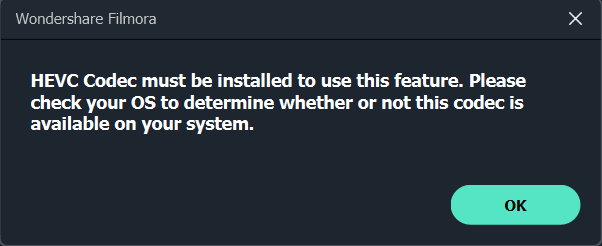
If you’ve tried playing H.265 (HEVC) videos on your Windows PC, you might have encountered issues like missing codecs or an unsupported file format error. HEVC (High Efficiency Video Coding) is a modern video compression standard that delivers high-quality video at smaller file sizes, making it popular for 4K and 8K videos. However, Windows doesn’t include native support for HEVC codecs by default.
But don’t worry! In this guide, I’ll show you how to install Download Free HEVC Codecs on your Windows device so you can enjoy seamless playback of H.265 videos without spending a dime.
What Is HEVC (H.265) and Why Does It Matter?
Enjoy smooth H.265 (HEVC) video playback and seamless support for High-resolution content.
If you’ve tried playing H.265 (HEVC) videos on your Windows PC, you might have encountered frustrating issues like missing codecs, unsupported file format errors, black screens, stuttering, or poor performance. HEVC, also known as High Efficiency Video Coding or H.265, is a modern video compression standard that delivers superior video quality at significantly smaller file sizes compared to older formats like H.264. Install Free HEVC Codecs Extentions It has become the go-to choice for 4K, 8K, HDR, and high-bit-depth content from sources like smartphones, action cameras, drones, Blu-ray rips, and streaming services.
HEVC, standardized as MPEG-H Part 2, was designed as the successor to H.264/AVC. It offers 25-50% better compression efficiency at the same quality level, or substantially higher quality at the same bitrate. This means:
Smaller file sizes: A 4K video that might take 30 GB in H.264 can shrink to 4-6 GB or less in HEVC while looking sharper.
Better support for high resolutions: Up to 8K UHD (8192×4320), higher frame rates, 10-bit/12-bit color depth, and HDR formats like HDR10, HDR10+, and Dolby Vision.
Improved bandwidth efficiency: Ideal for streaming, mobile viewing, and storage-constrained devices.
Benefits of Installing Free HEVC Codecs on Windows 11/10
- Seamless Playback: Watch H.265 videos natively in built-in apps without third-party players.
- Hardware Acceleration: Leverages your CPU/GPU for efficient decoding, reducing lag and heat.
- Future-Proofing: Essential as more content shifts to HEVC/HEIF (for photos too) to Improve Install Free HEVC Codecs Extentions.
- Storage and Bandwidth Savings: Handle larger libraries of high-quality videos without filling your drive.
- Free Solution: Avoid the paid Microsoft Store version (~$0.99) by using the “from Device Manufacturer” package.
FAQs About HEVC Codecs on Windows
Is the free HEVC extension safe? Yes, when downloaded from reputable mirrors of Microsoft’s package. Scan with Windows Defender.
Does it work on Windows 11? Absolutely—fully compatible with the latest versions.
Can I encode HEVC videos too? The extension primarily focuses on decoding, but hardware support can aid encoding in compatible software.
What about HEIC photos? A related HEIF extension (often bundled or separate) handles Apple HEIC images.
Will it improve streaming? Indirectly, by enabling better local playback of downloaded content.
Conclusion: Download Install Free Hevc Codex Extentions.
Installing the free HEVC Video Extensions is one of the quickest ways to resolve codec issues and enjoy high-quality video on your Windows 10 or 11 PC. Whether you’re a movie enthusiast, content creator, or simply dealing with smartphone footage, this extension future-proofs your media experience without any cost.
Download the free HEVC Video Extensions package directly from the trusted link below on this page and follow the step-by-step instructions above to get started in minutes. Don’t let missing codecs ruin your viewing—grab the extension today, install it, and start enjoying buttery-smooth 4K and 8K H.265 playback. If you run into any issues, drop a comment below with your Windows version and error details for more tailored help.
Install FREE HEVC Codecs Extentions Below, download HEVC Video Extensions , install H.265 codec Windows 10, play HEVC videos without errors.