
10 Best MCP Servers for Claude Code (and How to Install Each)
Quick answer
The 10 best MCP servers for Claude Code, and the job each one does:
- Context7: current library docs
- Playwright: browser automation
- Chrome DevTools: debugging
- Firecrawl: web pages to Markdown
- Perplexity: live web search
- GitHub: issues and pull requests
- Serena: symbol-level code edits
- DBHub: database queries
- shadcn/ui: UI components
- Task Master: task planning
Most install with one terminal command, claude mcp add. To check them, type /mcp inside Claude Code.
Claude Code is good at reading and writing code, but out of the box it can’t see your browser, your database, today’s documentation or your GitHub issues. MCP servers fix that. Each one is a small connector that hands Claude a new set of tools. This guide covers the 10 servers from my one-minute video, with what each one does, what you need first, the exact install command from the official docs, and a prompt to try right after.
The map below groups the 10 servers by the job they do for Claude, so you can jump to the ones that match your work.
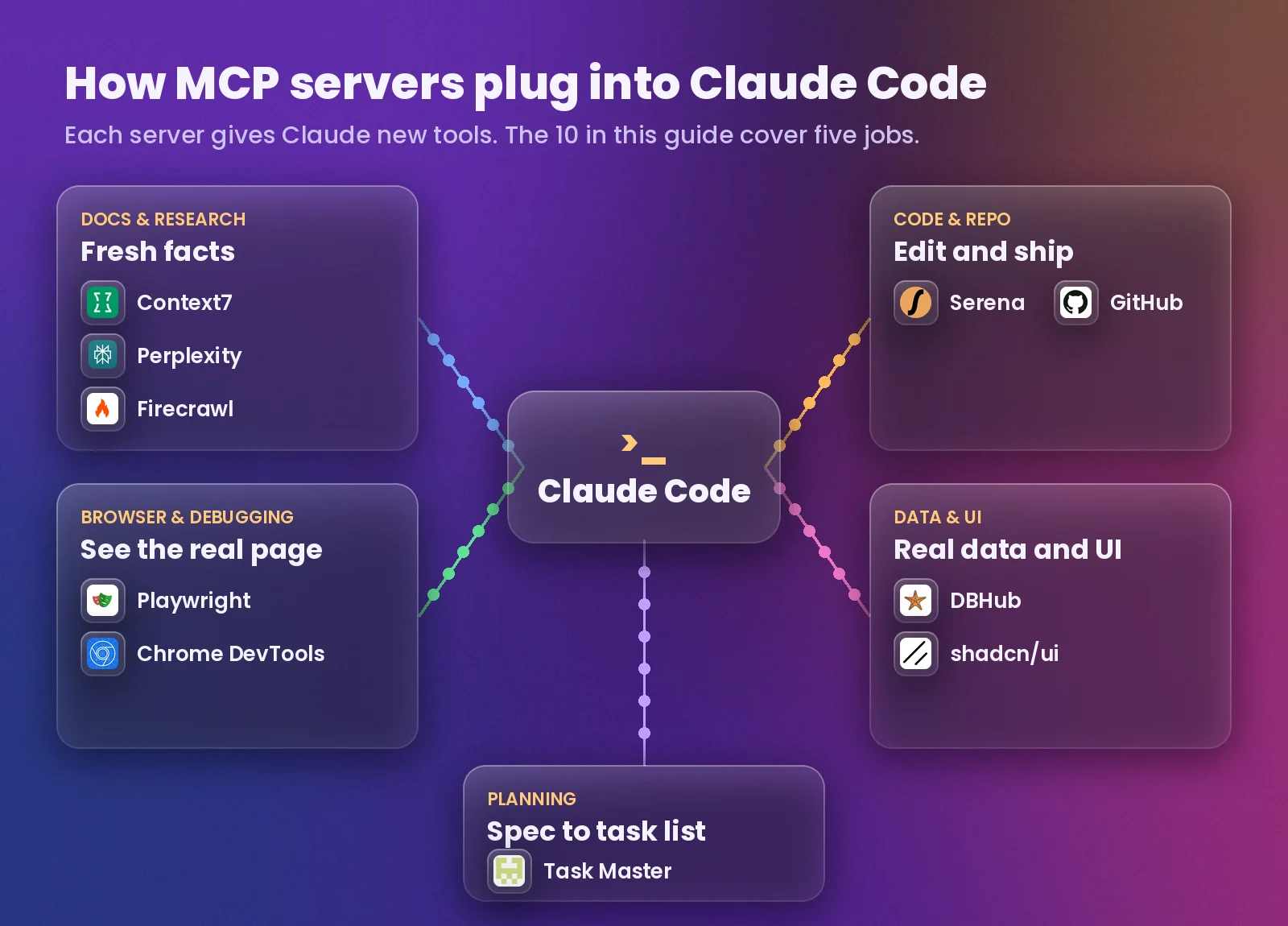
How adding an MCP server works
MCP stands for Model Context Protocol, an open standard Anthropic released in November 2024. A server can run on your own computer (Claude Code starts it with a command such as npx) or online (Claude Code connects to a URL over HTTP). Either way you add it once from your normal terminal, not from inside a Claude Code chat.
- Local server:
claude mcp add <name> -- <command>. Everything after--is the command that starts the server. Pass keys with--env KEY=value. - Online server:
claude mcp add --transport http <name> <url>. Add a key with--header "Authorization: Bearer YOUR_KEY". - Check it: run
claude mcp listin the terminal, or type/mcpinside Claude Code. A working server shows as connected. - Remove it:
claude mcp remove <name>.
The --scope option decides where the server is saved and who gets it:
| Scope | Works in | Shared with your team |
|---|---|---|
local (default) | The current project only | No |
project | The current project only | Yes, through a .mcp.json file you commit |
user | Every project on your computer | No |
Tip: Install the servers you use everywhere (Context7, Perplexity) with --scope user, and project-specific ones (DBHub, shadcn/ui) with the default local scope.
1Context7: up-to-date library docs
Claude learned most libraries from training data that can be a year or more old, so it sometimes writes code for an API that has changed or no longer exists. Context7 pulls the current, version-specific documentation and code examples for the library you’re using and puts them in front of Claude before it writes anything.
- In your terminal, run this. It signs you in, creates a free API key and connects Context7 to Claude Code.
npx ctx7 setup --claude - Prefer a plugin? Run these two inside Claude Code:
/plugin marketplace add upstash/context7/plugin install context7@context7-marketplace - Restart Claude Code and check it with
/mcp.
Try it: “Set up authentication in my Next.js app. use context7”. Adding “use context7” at the end of a prompt tells Claude to look up the docs first.
Tip: The key is optional, but a free one from your Context7 dashboard gives you higher rate limits. Official repo: upstash/context7.
2Playwright MCP: Claude drives a real browser
Microsoft’s Playwright MCP lets Claude open pages, click buttons, type into forms, switch tabs and test your web app on its own. It works from the page’s accessibility tree (a structured list of everything on the page) rather than screenshots, so it’s fast and doesn’t need a vision model.
- Run this in your terminal:
claude mcp add playwright npx @playwright/mcp@latest - Start Claude Code and check
/mcp. The first run downloads a browser if needed.
Try it: “Open localhost:3000, sign up with a test account, and tell me if any step fails.”
Tip: Extra abilities, such as saving PDFs or mocking the network, are switched on with the --caps option. Official repo: microsoft/playwright-mcp.
3Chrome DevTools MCP: console, network and performance
Built by the Chrome DevTools team, this server gives Claude a live Chrome browser plus the tools you use to debug: console messages with source-mapped stack traces, network requests, screenshots and performance traces. Instead of guessing why a page breaks, Claude reads the actual errors and fixes its own bugs.
- Inside Claude Code, add the plugin marketplace:
/plugin marketplace add ChromeDevTools/chrome-devtools-mcp - Then install the plugin. This adds the server and its skills.
/plugin install chrome-devtools-mcp@chrome-devtools-plugins - Or add it as a plain MCP server from your terminal:
claude mcp add chrome-devtools -- npx -y chrome-devtools-mcp@latest
Try it: “Open my checkout page, read the console and network errors, and fix what’s breaking it.”
Heads up: Claude can see everything in that browser window, so don’t sign in to personal accounts there. Usage statistics are on by default; add --no-usage-statistics to opt out. Official repo: ChromeDevTools/chrome-devtools-mcp.
4Firecrawl MCP: any web page as clean Markdown
When you paste a link, Claude often gets a wall of messy HTML or can’t read the page at all. Firecrawl turns any URL into clean Markdown or structured data. It can also search the web, map every URL on a site, crawl many pages and parse PDFs.
- Create an account and copy your key from the Firecrawl dashboard (it starts with
fc-). - Run this, with your key in place of
fc-YOUR_API_KEY:claude mcp add firecrawl --env FIRECRAWL_API_KEY=fc-YOUR_API_KEY -- npx -y firecrawl-mcp - Restart Claude Code and check
/mcp.
Try it: “Scrape the pricing page of this site and give me a table of the plans.”
Tip: Firecrawl also runs a hosted server at https://mcp.firecrawl.dev/v2/mcp, and its keyless tier covers scrape, search and parse within daily limits. Set limits when you crawl, because a full site can return a lot of text. Official repo: firecrawl/firecrawl-mcp-server.
5Perplexity MCP: live web search in your terminal
The official Perplexity server gives Claude real-time web search with sources, so you stop switching tabs to look things up. It adds four tools: search, ask, research (deeper reports) and reason (step-by-step answers).
- Get an API key from the Perplexity API portal at console.perplexity.ai.
- Add the hosted server, with your key in place of
YOUR_API_KEY:claude mcp add --transport http perplexity https://api.perplexity.ai/mcp --header "Authorization: Bearer YOUR_API_KEY" - Or run it locally instead:
claude mcp add perplexity --env PERPLEXITY_API_KEY="your_key_here" -- npx -y @perplexity-ai/mcp-server
Try it: “Search for what changed in the latest Node.js LTS release and list anything that could break my project.”
Tip: The hosted version needs nothing installed and updates itself. Official repo: perplexityai/modelcontextprotocol.
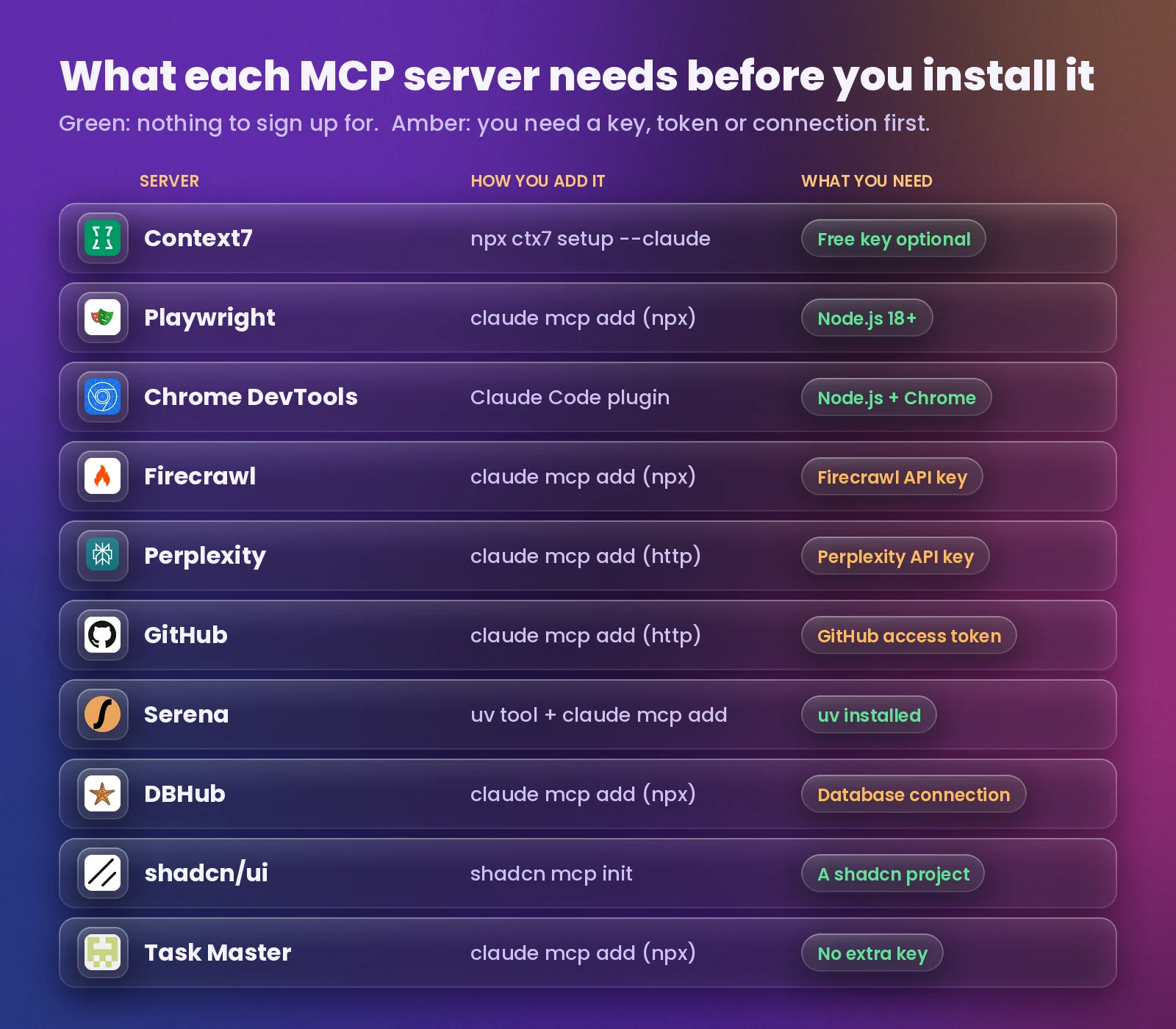
Before you start installing, check what each server needs. Six of them work without signing up for anything; the other four need a key, a token or a database connection.
6GitHub MCP Server: issues and pull requests
GitHub’s official server connects Claude to your repositories, issues, pull requests and more without leaving the chat. Claude can read an issue, make the fix, open a pull request and review code, all from one conversation.
- Create a personal access token in GitHub › Settings › Developer settings › Personal access tokens. GitHub suggests the
repo,read:packagesandread:orgscopes. - In your terminal (not inside Claude Code), run this with your token in place of
YOUR_GITHUB_PAT:claude mcp add --transport http github https://api.githubcopilot.com/mcp -H "Authorization: Bearer YOUR_GITHUB_PAT" - Restart Claude Code and confirm with
claude mcp list.
Try it: “Read issue #12 in this repo, fix it on a new branch and open a pull request.”
Heads up: A token is a password. Keep it out of files you commit, and give it only the scopes you need. Official repo: github/github-mcp-server.
7Serena: rename across 40 files in one step
Claude normally edits code as plain text, line by line. Serena gives it IDE-style tools that understand symbols: find a function, see every place it’s used, and rename it everywhere at once. It uses free language servers for over 40 languages and remembers your project between sessions.
- Install uv, then install Serena:
uv tool install -p 3.13 serena-agent - Set it up:
serena init - Add it to Claude Code for all your projects:
claude mcp add --scope user serena -- serena start-mcp-server --context claude-code --project-from-cwd - Check it with
/mcp.
Try it: “Rename getUser to fetchUserProfile everywhere and update every call site.”
Tip: Serena’s team says to install it this way, not from an MCP marketplace, because those listings can carry outdated commands. If it starts slowly, raise the timeout with MCP_TIMEOUT=60000. Official repo: oraios/serena.
8DBHub: query your real database schema
DBHub by Bytebase connects Claude to PostgreSQL, MySQL, MariaDB, SQL Server and SQLite. Claude sees your actual tables and columns, so it writes queries that match your schema instead of guessing. It’s the example Anthropic uses in the Claude Code docs for connecting a database.
- Copy your database connection string (DSN), ideally for a read-only user.
- Run this, with your own DSN in the quotes:
claude mcp add --transport stdio db -- npx -y @bytebase/dbhub --dsn "postgresql://readonly:pass@localhost:5432/mydb" - Run
/mcpand check that thedbserver is connected.
Try it: “How many users signed up each month this year? Show the SQL you ran.”
Heads up: Never point an AI at a production database with write access. Use a read-only user, and DBHub’s read-only mode and row limits. Official repo: bytebase/dbhub.
9shadcn/ui MCP: find and install real components
Ask Claude for a login form and it often writes one from scratch that doesn’t match the rest of your app. The shadcn MCP server lets Claude browse the shadcn/ui registry, search for components and install them straight into your project, so the UI looks consistent and professionally built.
- In your project folder, run this (or the pnpm, yarn or bun version):
npx shadcn@latest mcp init --client claude - Restart Claude Code and run
/mcp. It should show as connected.
Try it: “Create a contact form using components from the shadcn registry.”
Tip: The standard shadcn/ui registry needs no setup. Company or private registries go in your project’s components.json. Official docs: ui.shadcn.com/docs/mcp.
10Task Master: turn a spec into ordered tasks
Big projects fall apart when Claude tries to do everything at once. Task Master reads your product requirements document (PRD), breaks it into tasks with dependencies, and keeps track of what’s done, so Claude works through the plan one task at a time.
- Run this in your terminal:
claude mcp add task-master-ai --scope user -- npx -y task-master-ai@latest - In Claude Code, say “Initialize taskmaster-ai in my project”.
- Write your spec in
.taskmaster/docs/prd.txt, then say “Can you parse my PRD?”. - To run it without a separate API key, say “Change the main model to claude-code/sonnet”.
Try it: “What’s the next task I should work on?”, then “Help me implement task 3.”
Tip: You can also use keys from Anthropic, OpenAI, Google, Perplexity and others for its research and planning models. Official repo: eyaltoledano/claude-task-master.
+How the 10 work together
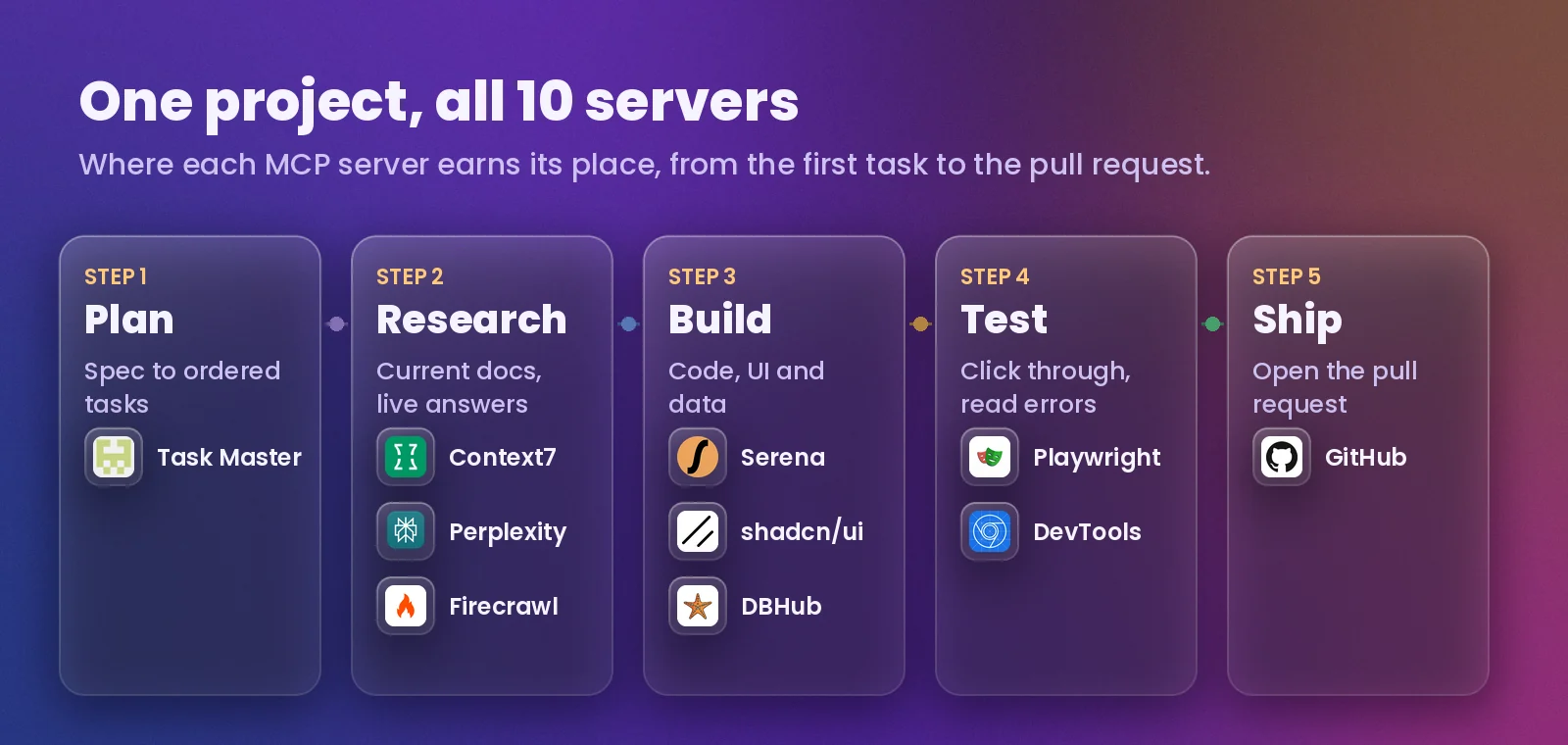
You don’t need all 10 on day one, but they fit together neatly. Task Master plans the work, Context7, Perplexity and Firecrawl bring in current information, Serena, shadcn/ui and DBHub do the building, Playwright and Chrome DevTools test it in a real browser, and the GitHub server ships it as a pull request.
Want the one-minute version? Here’s the YouTube Short this guide is based on.
Common mistakes with MCP servers
- Installing every server you can find. Each one adds tools Claude has to consider. Keep the ones you use and add project-specific servers at the project level.
- Running the add command inside a Claude Code chat.
claude mcp addgoes in your normal terminal. Plugin commands that start with/pluginare the ones you type inside Claude Code. - Pasting keys into project files. Use
--envor a header when you add the server, and never commit a.mcp.jsonthat contains a real key or token. - Giving full database or account access. Use read-only database users and narrow token scopes. An MCP server can do anything its credentials allow.
Frequently asked questions
What is an MCP server in Claude Code?
An MCP server is a connector that gives Claude Code new tools, such as reading a web page, searching documentation or querying a database. Claude decides when to use those tools while it works on your request.
Are these MCP servers free?
All 10 servers are free to install. Context7, Playwright, Chrome DevTools, Serena, shadcn/ui and Task Master need no paid account. Firecrawl and Perplexity use API keys from their own services, GitHub needs a free personal access token, and DBHub needs access to your own database.
How do I check that an MCP server is working?
Run claude mcp list in your terminal or type /mcp inside Claude Code. Each server shows whether it’s connected, needs you to sign in, or failed to start.
How do I remove an MCP server from Claude Code?
Run claude mcp remove followed by the server’s name, for example claude mcp remove playwright, then restart Claude Code.
Which MCP server should I install first?
Start with Context7 if you code against libraries that change often, and Playwright or Chrome DevTools if you build websites. Both remove the most common reasons Claude gets things wrong: outdated information and not seeing the actual page.
Bottom line
Install Context7 and one browser server (Playwright or Chrome DevTools) today, check them with /mcp, and add the others as your projects need them. If a server won’t connect, run claude mcp list to see its status and make sure you ran the add command in your terminal, not inside a chat.
